DICS - Documentation Control
<Learm More - Open Help Manual>
Documented Information Issuing and Control System Software
<Learm More - Open Help Manual>
Documented Information Issuing and Control System Software
Introducing DICS: Your Affordable Documented Information Control Management Software
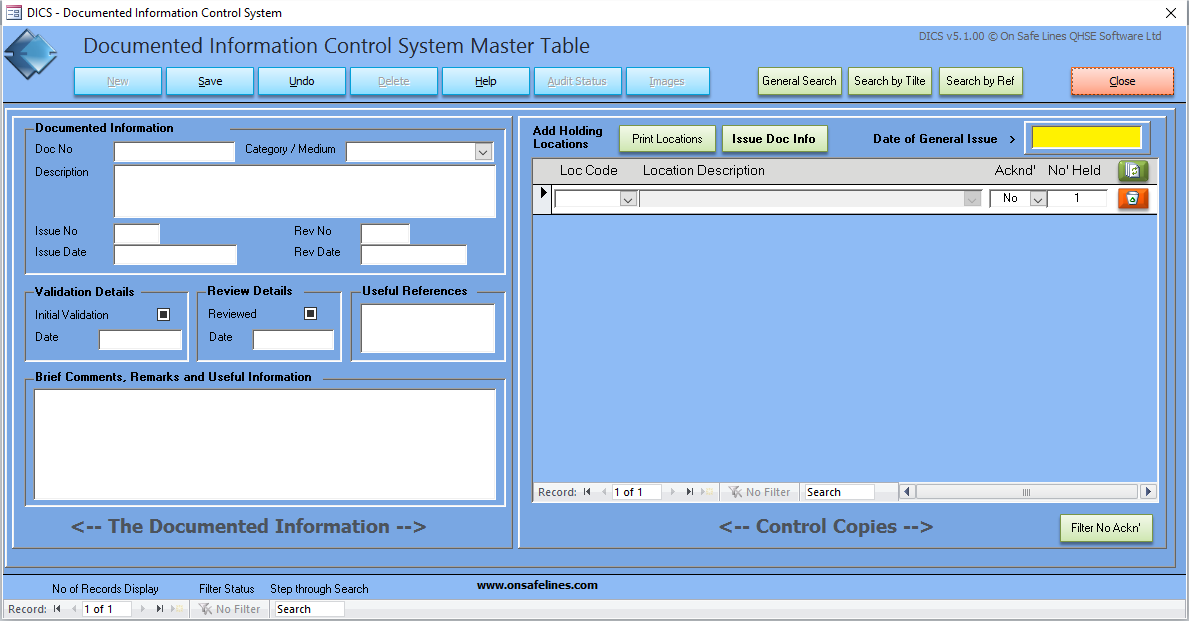
DICS is a comprehensive software program meticulously crafted for the management of controlled company documentation. Tailored for Quality, Health and Safety, or Environmental professionals responsible for issuing, updating, and removing controlled documentation, DICS streamlines these processes with precision.
At its core, DICS aims to simplify the management of your company's controlled documentation, stripping away bureaucracy to enhance efficiency. It serves as a vital tool for companies striving to meet the rigorous requirements of their Quality, Safety, and/or Environmental Management Systems.
From the initial review and validation to issuing, acknowledgment sign-off, and subsequent amendments, DICS guides users through every step of the documentation lifecycle. With comprehensive reporting capabilities, DICS empowers document controllers to make informed decisions based on real-time data, ensuring that the right documents are in the right locations at all times.
DICS is designed to manage a range of critical processes, including:
- Approving controlled documented information adequacy before issuance
- Recording and updating controlled documentation as necessary, followed by re-approval
- Identifying changes and current revision statuses of controlled documentation
- Ensuring relevant versions of applicable documentation are readily available
- Managing controlled documentation from external sources
- Controlling obsolete documentation
- Facilitating easy auditing of the document control system
Moreover, DICS comes equipped with a variety of standard reports and letters to further streamline your operations:
- Issue Letters for Controlled Documented Information
- Acknowledgement Status List for Controlled Documented Information
- Outstanding Acknowledgement Reminder List for Controlled Documented Information
- Controlled Documented Information Held By Location
- Types of Controlled Documented Information Held By Location
And much more...
Discover the power of DICS today and revolutionize your document management processes without breaking the bank.
DICS - Documented Information Control System has been <certified 100%> clean by Softpedia.com
Read an <Independent review of DICS> - Accident and Investigation Management was reviewed by Vladimir Ciobica